Understanding Network Devices
In this blog we will understand technologies such as Internet, Networks, Modem and routers and how we use them in our day to day life.
What is a Modem and how it connects your network to the internet?
To fully understand this concept we will make our concepts strong in Internet and network. Then we will move towards “What is Modem”.
Starting with “What is Internet ?”
Most of us don’t even know what actually is internet, some refer internet as ‘net’ or ‘data’ in our daily conversations for our convenience, because we don’t know what is internet (even me too). So lets start with this word “Inter-net”.
Internet help us to connect with people globally by connecting different networks. so here Inter means Interconnected like we use words as Interbus and net means network
Very popular description of Internet you may hear is “Network of Networks”. To understand this we need to know first about Network.
Network
We use the word Network in our daily life as “I am building Network with my clients to gain more reach“ , so here we are using Network as making or building connections with someone.
So in tech we use Network to show connections, like network between two computers or something. You may know that we humans laid the optical fibers across oceans all over the world to make network between each part of world, and making internet possible.
So we have made global connections between networks using these fiber optic cables. Thus we made a Network of Networks which is Internet.
Back to our Question “what is Mo-Dem ?”
You may have now question why i separated this modem word as Mo-Dem because modem is short form of Modulator and Demodulator. Now again we have to understand Modulator and Demodulator to go ahead !
Modulator
As we don’t know what is meaning of word “modulator”, I find out that modulator comes from word modulate which means to change or control a signal.
In our world of internet Modulator is used to convert the digital signals ( which comes from computer as input ) into analog signals or in simple words into continuous signals which goes into telephone / cable lines.
Demodulator
Yes its opposite of modulator. It converts the analog signals to digital signals
Now the question is why do we need Modulator and DeModulator or Modem, why and where it is used ?!
A modem is mainly used for cable or telephone line connections (like DSL or coaxial cable).
In these connections, the modem converts Digital signals ↔ Analog signalsHowever, modems are NOT used for optical fiber connections. For fiber internet, we use a device called ONT (Optical Network Terminal).
The google.com
Every website’s domain name has one or more IP addresses stored in DNS records.
To reach any website like google.com we need their IP address which we get from DNS servers. If you want to know what DNS server is, then you have to search it by your own sorry.
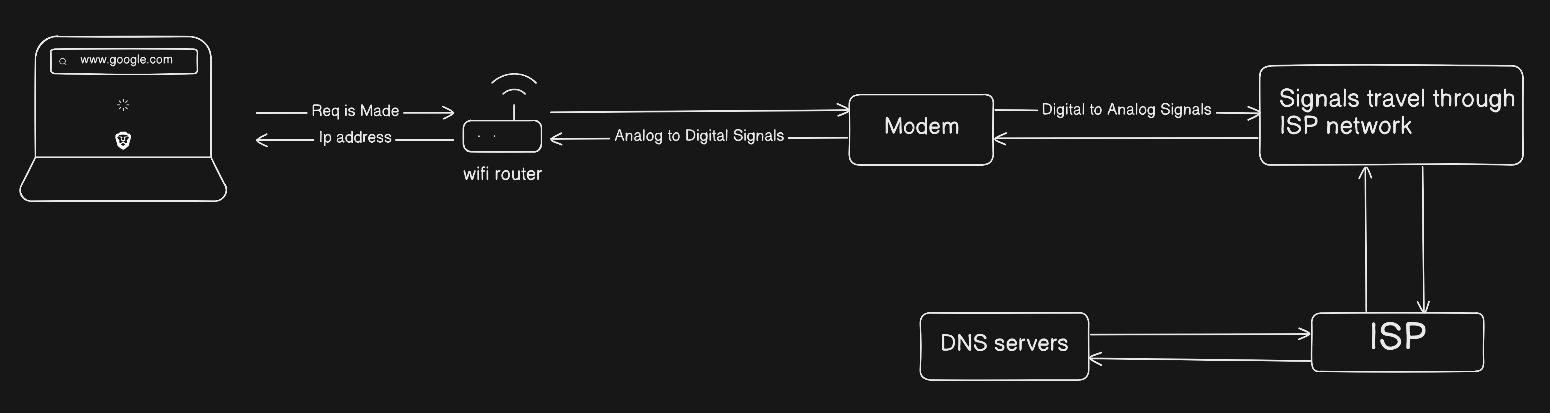
As you type www.google.com on your browser it has created a request to visit to this website. Now this request travels through router then Modem and converts you digital input signals from computer to analog signals which travels through cables and goes to your ISP (internet service provider). Then the ISP sends the request to DNS server. After getting the IP address of the website the data comes back to ISP and then comes to our modem which converts the analog signals to digital signals because our computer only knew 1 and 0, then it comes to router and finally to our computer.
And as we got ip address of website now our browser will do some HTTPS request to googles server and we can see google.com on our browser live.
we will go in more depth ahead just wait and
watchread !
What is a Router and how it directs traffic?
Starting with understanding the word “Router” those who teach called as teacher , those who write blogs are blogger so like that those who provide route is Router. I know it might sound weird so lets understand it in more depth
Route (path)
Routers are used to navigate the data packets to their destination either they are coming from Computer as input for a request or its coming from a Server as a response.
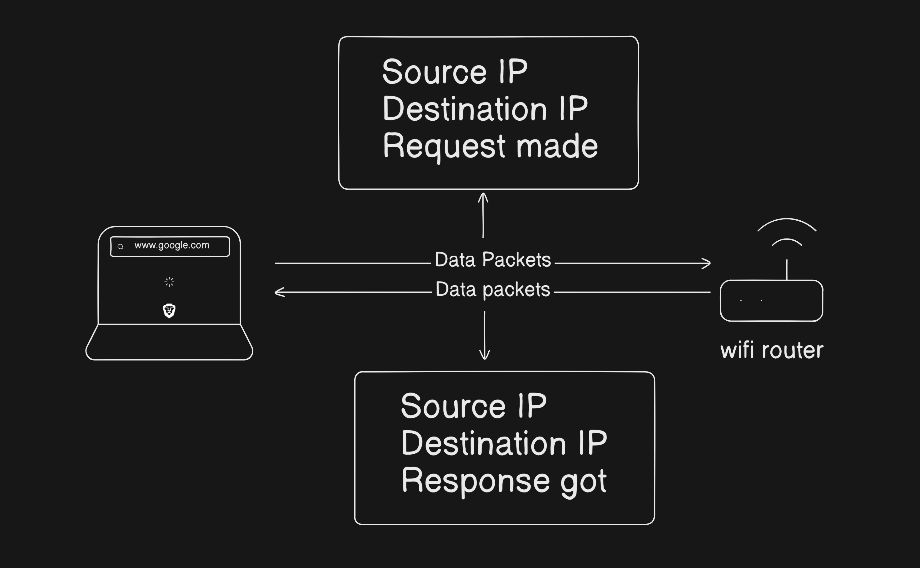
Here our Wifi Router gets the Data packets from our computer which contains Source IP, Destination IP, and Request made
Why we need Destination IP ?
Without Destination IP router does not know where to send this data packet.
If you don’t know where you have to go, why to blame google maps?
Router finds the best next path to Destination IP address for your Data Packet.
Destination IP can be DNS server’s IP address from where we can get google.com IP address, and then we create a new Data Packet where destination IP is what we get from DNS server and then we get response from google’s server and we load the website successfully !
Why we need Source IP ?
Without Source IP router don’t know who has send the request and whom to give response.
What if Amazon don’t know your address and bill is already paid ?
As router get the response back from Server whose Destination IP address was given in Data Packet, router will route the Data Packet to the Computer whose ip address match with source ip and delivers the response got !
Switch vs Hub: How local networks actually work?
First lets understand What are local networks and then we will study about Switch and Hub
What is Local Network ?
We have already discussed very well about networks and what they are and how they make Internet now lets see about Local Network
Local means => a particular place (near you). Which means the network which is created near you that is what Local Network.
This Network can be between your Laptop or Mobile or Computer with Printer. We can also say this Local Network can be in your home or office or a place near you .
So what is NOT a Local Network ?
Internet ! THE GLOBAL NETWORK
Okay we have got the idea about Local Network now what is this Switch and Hub ?
Broadcast VS Targeted
There is difference in Switch and Hub which tells you about them
This is very normal for you that, If you have send a instruction to print a pdf to your printer it will only go to printer not to the other devices.
You may ask what am i saying if I give a instruction to Printer to print a pdf it will go to my Printer only ?!
Yes, because you are using SWITCH
Switch
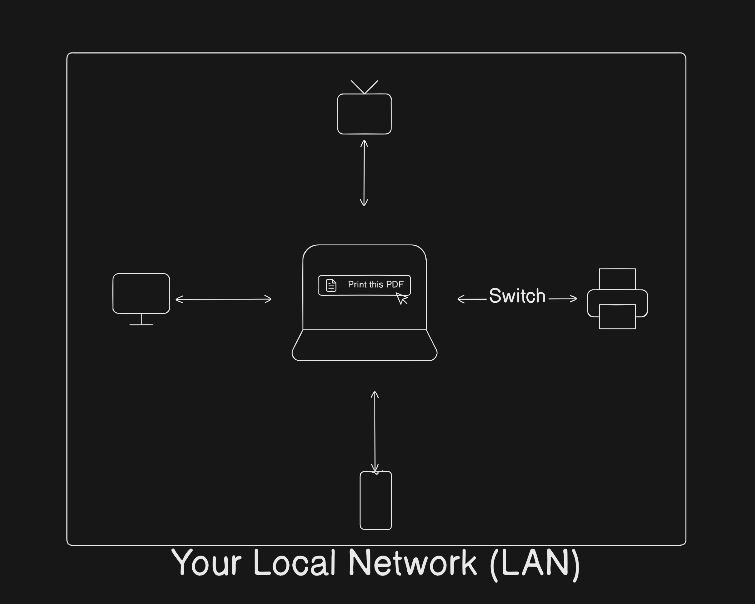
This Network communication device only sends the data which you have targeted only which we use today.
Hub
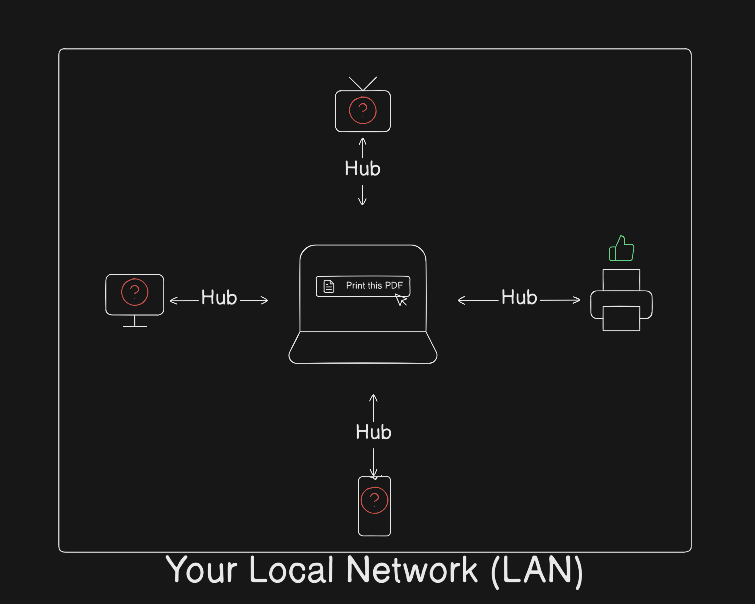
In a hub, all connected devices receive the data, even if the data is meant for only one device (like a printer).
Which was a very big problem as you understand in earlier days and its solution is using Switch as communication device
What is a Firewall and why security lives here?
I guess many of you know the Firewall. While companies purchase expensive ones, you likely already have one working for your security. It acts as a security guard for the data you receive (blocking unwanted connections from entering your network) and the data you send. Crucially, it doesn't just check if a site is "trusted." Instead, it checks if the connection follows your Security Rules.
So simply, Firewall just uses some rules and if it satisfies the rules it can go. It is usually built into your WiFi router (Hardware), or you likely have Firewall software pre-installed inside your Windows or Mac-OS.
What is a Load Balancer and why scalable systems need it?
First we will see what is Load Balancer, why it exists ?
Balance the Load !
As of now Jan 19 2026 Around 6 billion people using the Internet, which is very very huge no. of people. What if we take a million people and make them to open www.google.com at the same time, what do you think will happend. There will be huge load on the google’s server so to Balance this Load we have introduced Load Balancer
Load balancer will distributes incoming user requests across multiple servers. so that no single server gets overloaded.
Creating Scalable systems
To Create a scalable system to manage millions of user you need Load balancer to distribute traffic across servers. Which Prevents overload on a server.
Need more than a server instead of just upgrading one so Load balancer can do its job more perfectly.
Time for Summary
We have covered what is Internet, Network and Working of modem and understand the flow of how we see the google.com site
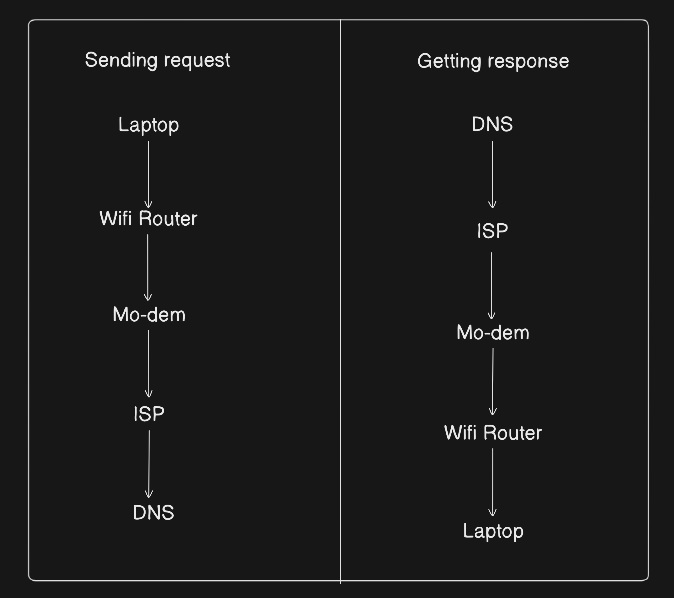
Understanding the working of Router, how it directs our data packet to destination Ip address and provides the response back to the computer of same ip address as of source ip address
We Learned about the Local Network and in that we have seen Switch and Hub, two Local Network Connection devices
And then about Firewall and security stuff
And then about Scalability and what needs Big tech companies to make their system scalable like Load balancers